SpaceX Launch Outcome Prediction Model

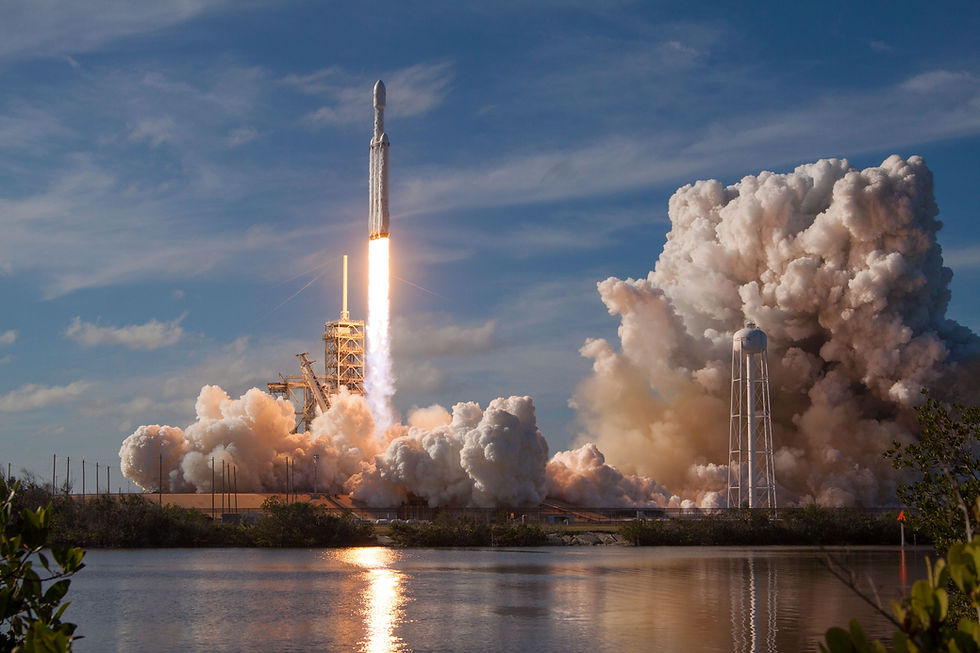
In this project, we will predict if the Falcon 9 first stage will land successfully. SpaceX advertises Falcon 9 rocket launches on its website with a cost of 62 million dollars; other providers cost upward of 165 million dollars each, much of the savings is because SpaceX can reuse the first stage. Therefore if we can determine if the first stage will land, we can determine the cost of a launch. This information can be used if an alternate company wants to bid against SpaceX for a rocket launch.
CONTENT OF THE PROJECT
For complete data analysis process, visit the notebook on Kaggle.
DATA COLLECTION
We will be collecting the data from SpaceX API using GET request or through web scrapping using Beautiful Soup library.
Here are the links for the data set:
SpaceX API source: SpaceX-API
SpaceX Web scraping source: List of Falcon 9 and Falcon Heavy Launches
Libraries needed for Data collection and wrangling:
import requests
import pandas as pd
import numpy as np
import datetime
We will be defining a series of helper functions that will help us use the API to extract the needed information.
From the Rockets API we would like to learn the booster's name
From the Payloads API we would like to learn the mass of the payload and the orbit that it is going to
From the Launchpad API we would like to know the name of the launch site being used, the longitude, and the latitude.
From Cores API we would like to learn the outcome of the landing, the type of the landing, number of flights with that core, whether grid fins were used, whether the core is reused, whether legs were used, the landing pad used, the block of the core which is a number used to separate version of cores, the number of times this specific core has been reused, and the serial of the core.
From Rockets API
def getBoosterVersion(data):
    for x in data['rocket']:
       if x:
        response = requests.get("https://api.spacexdata.com/v4/rockets/"+str(x)).json()
        BoosterVersion.append(response['name'])
From Payloads API
def getPayloadData(data):
    for load in data['payloads']:
       if load:
        response = requests.get("https://api.spacexdata.com/v4/payloads/"+load).json()
        PayloadMass.append(response['mass_kg'])
        Orbit.append(response['orbit'])
From Launchpads API
def getLaunchSite(data):
    for x in data['launchpad']:
       if x:
         response = requests.get("https://api.spacexdata.com/v4/launchpads/"+str(x)).json()
         Longitude.append(response['longitude'])
         Latitude.append(response['latitude'])
         LaunchSite.append(response['name'])
From Cores API
def getCoreData(data):
    for core in data['cores']:
            if core['core'] != None:
                response = requests.get("https://api.spacexdata.com/v4/cores/"+core['core']).json()
                Block.append(response['block'])
                ReusedCount.append(response['reuse_count'])
                Serial.append(response['serial'])
            else:
                Block.append(None)
                ReusedCount.append(None)
                Serial.append(None)
            Outcome.append(str(core['landing_success'])+' '+str(core['landing_type']))
            Flights.append(core['flight'])
            GridFins.append(core['gridfins'])
            Reused.append(core['reused'])
            Legs.append(core['legs'])
            LandingPad.append(core['landpad'])
Now let's start requesting rocket launch data from SpaceX API with the following endpoint:
url = 'https://api.spacexdata.com/v4/launches/past'
response = requests.get(url)
data = pd.json_normalize(response.json())
You will notice that a lot of the data are IDs. For example the rocket column has no information about the rocket just an identification number.
We will now use the API again to get information about the launches using the IDs given for each launch. Specifically, we will be using columns rocket, payloads, launchpad, and cores.
In the "data" data frame, we only need the features "rocket", "payloads", "launchpad", "cores", "flight_number", "date_utc".
data = data.iloc[:,[4,11,12,20,13,15]]We will remove rows with multiple cores because those are falcon rockets with 2 extra rocket boosters and rows that have multiple payloads in a single rocket.
data = data[data['cores'].map(len)==1]
data = data[data['payloads'].map(len)==1]
Since payloads and cores are lists of size 1 we will also extract the single value in the list and replace the feature.
data['cores'] = data['cores'].map(lambda x : x[0])
data['payloads'] = data['payloads'].map(lambda x : x[0])
We also want to convert the date_utc to a datetime datatype and then extracting the date leaving the time. Then, using the date, we will restrict the dates of the launches.
data['date'] = pd.to_datetime(data['date_utc']).dt.date
data = data[data['date'] <= datetime.date(2020, 11, 13)]
We will collect the data from other endpoints using the helper functions we built and the "data" data frame as the input of those helper functions.
The data from these requests will be stored in lists and will be used to create a new data frame.
BoosterVersion = []
PayloadMass = []
Orbit = []
LaunchSite = []
Outcome = []
Flights = []
GridFins = []
Reused = []
Legs = []
LandingPad = []
Block = []
ReusedCount = []
Serial = []
Longitude = []
Latitude = []
Applying the helper functions to GET information from different endpoints
getBoosterVersion(data)
getLaunchSite(data)
getPayloadData(data)
getCoreData(data)
Finally let's construct our final dataset using the data we have obtained from other endpoints and the data from data. We combine the columns into a dictionary.
launch_dict = {'FlightNumber': list(data['flight_number']),
'Date': list(data['date']),
'BoosterVersion':BoosterVersion,
'PayloadMass':PayloadMass,
'Orbit':Orbit,
'LaunchSite':LaunchSite,
'Outcome':Outcome,
'Flights':Flights,
'GridFins':GridFins,
'Reused':Reused,
'Legs':Legs,
'LandingPad':LandingPad,
'Block':Block,
'ReusedCount':ReusedCount,
'Serial':Serial,
'Longitude': Longitude,
'Latitude': Latitude}

data = pd.DataFrame(launch_dict)
We will remove the Falcon 1 launches keeping only the Falcon 9 launches.
data_falcon9 = data[data['BoosterVersion'] == 'Falcon 9']Now that we have removed some values we should reset the FlightNumber column.
data_falcon9.iloc[0:, 0] = list(range(1, data_falcon9.shape[0]+1))
data_falcon9 = data_falcon9.copy()
data_falcon9.reset_index(inplace=True)
data_falcon9.drop('index', axis=1, inplace=True)
DATA WRANGLING
Let's deal with the missing values. We can see below that some of the rows are missing values in our dataset. Before we can continue, we must deal with these missing values. The "LandingPad" column will retain the None values to represent when landing pads were not used.
data_falcon9.isnull().sum()Result:
FlightNumber       0
Date               0
BoosterVersion     0
PayloadMass        5
Orbit              0
LaunchSite         0
Outcome            0
Flights            0
GridFins           0
Reused             0
Legs               0
LandingPad        26
Block              0
ReusedCount        0
Serial             0
Longitude          0
Latitude           0
dtype: int64
We will calculate the average of the 'PayloadMass' and then utilize this average to substitute any missing values.
data_falcon9['PayloadMass'].mean()
data_falcon9.iloc[:, 3].replace(np.nan, data_falcon9['PayloadMass'].mean(), inplace=True)
Next, let's convert the landing outcome into numerical values. Using the Outcome, we will create a list where the element is zero if the corresponding row in Outcome is in the set bad_outcome; otherwise, it's one. This result will represent the classification value that represents the outcome of each launch. If the value is zero, the first stage did not land successfully; one means the first stage landed successfully.
bad_outcomes=set(landing_outcomes.keys()[[1,3,5,6,7]])
# 1, 3, 5, 6, 7 are the indexes of bad outcome from the data_falcon9
bad_outcomes
Result
{'False ASDS', 'False Ocean', 'False RTLS', 'None ASDS', 'None None'}landing_class = []
for out in range(len(data_falcon9['Outcome'])):
if data_falcon9['Outcome'][out] in bad_outcomes:
landing_class.append(0)
else:
landing_class.append(1)data_falcon9['Class']=landing_classFinally, the data_falcon9 data frame is the cleaned data we obtained from the SpaceX API.
data_falcon9.to_csv('SpaceX-Falcon9-Launch-Data.csv')EXPLORATORY DATA ANALYSIS
Let's explore which features have correlation with each other.
Heatmap - Correlation

Scatter Plot - Flight Number vs Payload Mass

We can see that as the flight number increases, the maximum payload they are launching also increases.
Histogram - Number of Launches per Launch Site

CCSFS SLC 40 leads in the number of launches compare with the other two.
Bar Plot - Orbit vs Success Rate

ES-L1, GEO, HEO, and SSO have 100 percent success rate for landing while SO has 0 percent success rate.
Scatter Plot - Payload Mass vs Orbit Type

With heavy payloads the successful landing or positive landing rate are more for Polar, LEO and ISS.
Line Plot - Launch Success Year Trend

You can observe that the success rate since 2013 kept increasing till 2020.
DATA PREPROCESSING
Features Engineering
We will now separate the features from the dependent variable. In this case, we want to predict the outcome of launches.
Features (X)
X = data_falcon9[['FlightNumber', 'PayloadMass', 'Orbit', 'LaunchSite', 'Flights', 'GridFins', 'Reused', 'Legs', 'LandingPad', 'Block', 'ReusedCount', 'Serial']]Dependent (y)
y = data_falcon9['Class'].to_numpy()Coverting Categorical Columns into Numerical Value
We will be using the function get_dummies() and X dataframe to apply OneHotEncoder to the column Orbits, LaunchSite, LandingPad, Serial, GridFins, Reused, and Legs.
X_OneHotEncoded = pd.get_dummies(data=X[['Orbit', 'LaunchSite', 'LandingPad', 'Serial', 'GridFins', 'Reused', 'Legs']])
X_OneHotEncoded = X_OneHotEncoded.astype(dtype='float64')
This one hot encoded data frame will be merged with the features data set.
X = X.copy()
X.drop(['Orbit', 'LaunchSite', 'LandingPad', 'Serial', 'GridFins', 'Reused', 'Legs'], axis=1, inplace=True)
X = pd.concat([X, X_OneHotEncoded], axis=1)
Feature Scaling
from sklearn.preprocessing import MinMaxScaler
from sklearn.model_selection import train_test_split
Normalize the data in X then reassign it to the variable X using the transform provided below. We are going to use the MinMaxScaler from the preprocessing module of Scikit-Learn.
transform = MinMaxScaler()
X = transform.fit_transform(X)
Data Splitting
We will use the function train_test_split to split the data X and Y into training and test data.
X_train, X_test, Y_train, Y_test = train_test_split(X, y, test_size=0.2, random_state=2)
print('X_train.shape=', X_train.shape, 'Y_train.shape=', Y_train.shape)
print('X_test.shape=', X_test.shape, 'Y_test.shape=', Y_test.shape)
Result
X_train.shape= (72, 80) Y_train.shape= (72,)
X_test.shape= (18, 80) Y_test.shape= (18,)
MODELING
We will employ four different models (SVM, Classification Trees, Logistic Regression, and KNN) and determine the optimal hyperparameters for each model. Subsequently, we will assess the model performance using the test data to identify the most effective approach.
For Logistic Regression
Parameters:
parameters =
     {
        "C":[0.01,0.1,1],
        'penalty':['l2'],
        'solver':['lbfgs']
     }
Best Parameter:
'C': 0.1, 'penalty': 'l2', 'solver': 'lbfgs'Accuracy:
0.8607142857142855Accuracy on the test data:
0.8333333333333334Confusion Matrix

For SVM
Parameters:
parameters =
    {
        'kernel':('linear', 'rbf','poly','rbf', 'sigmoid'),
        'C': np.logspace(-3, 3, 5),
        'gamma':np.logspace(-3, 3, 5)
    }
Best Parameter:
'C': 1.0, 'gamma': 0.03162277660168379, 'kernel': 'rbf'Accuracy:
0.8482142857142858Accuracy on the test data:
0.8333333333333334Confusion Matrix

For Decision Tree
Parameters:
parameters =
    {
        'criterion': ['gini', 'entropy'],
        'splitter': ['best', 'random'],
        'max_depth': [2*n for n in range(1,10)],
        'max_features': ['sqrt'],
        'min_samples_leaf': [1, 2, 4],
        'min_samples_split': [2, 5, 10]
    }
Best Parameter:
'criterion': 'entropy',
'max_depth': 16,
'max_features': 'sqrt',
'min_samples_leaf': 2,
'min_samples_split': 10,
'splitter': 'random'
Accuracy:
0.8767857142857143Accuracy on the test data:
0.6666666666666666Confusion Matrix

For KNN
Parameters:
parameters =
    {
        'n_neighbors': [1, 2, 3, 4, 5, 6, 7, 8, 9, 10],
        'algorithm': ['auto', 'ball_tree', 'kd_tree', 'brute'],
        'p': [1,2]
    }
Best Parameter:
'algorithm': 'auto', 'n_neighbors': 7, 'p': 2Accuracy:
0.85Accuracy on the test data:
0.8333333333333334Confusion Matrix

SUMMARY
MODEL | ACCURACY |
Logistic Regression | 0.833333 |
SVM | 0.833333 |
Decision Tree | 0.666667 |
KNN | 0.833333 |
CONCLUSION
We note that three models, namely Logistic Regression, SVM, and KNN, achieve an identical accuracy of 0.83333333. Consequently, any of these models, excluding the Decision Tree, can be selected to forecast the landing outcomes of SpaceX Falcon 9 rockets.
The initiative offers the potential to assist other providers in predicting the potential result of a launch. This data could prove valuable should a different company consider competing with SpaceX for a rocket launch contract.

